Stock changes faster than manual edits
Scale exports must match WooCommerce products, weights and variations. Custom import rules update existing records and create new variations without rebuilding the catalog by hand.
Hacienda Sur · production case study
A butcher shop’s online inventory changes with every production batch. Hacienda Sur needed to update more than 1,200 products and variations, check quantities and keep sales moving without editing the catalog item by item.
Turbo Digital connected the WooCommerce store to a desktop dashboard and API gateway: inventory imports, store controls, accounting, electronic invoicing and custom sales reports in one operation.
products and variations per import
project-reported import time
review with production stock first
Approximately five minutes for 1,200+ products and variations, as reported for this project. Timing varies by batch and environment.
The operational challenge
Scale exports must match WooCommerce products, weights and variations. Custom import rules update existing records and create new variations without rebuilding the catalog by hand.
Automated backups and staging creation provide a test environment using production stock. A visual preview and final crosscheck help staff spot discrepancies before proceeding.
Custom date ranges, daily or monthly views and product totals show what customers buy. These reports support stock planning and marketing decisions without assembling another spreadsheet.
From production stock to sales insight
Follow the sequence below. The illustration explains the dashboard workflow; it does not run imports or display private customer records.
Hacienda Sur · workflow illustration
Create a backup and a staging copy before the import. Compare against the same stock as production.
Backup → staging copy
Production stock → test import
The visual preview separates existing variations, new products and rows needing attention. Crosscheck quantities before approving.
Existing variations · new variations
Current stock → proposed stock
Pause access to the butcher shop during imports. Tailored rules update existing variations and create new ones consistently.
Butcher shop paused → import
Final crosscheck → reopen
Choose a date range, compare daily or monthly sales and review product totals to plan stock and promotions. Export the report to PDF.
Date range → day / month
Product sales → PDF report
The connected system
01 · Inventory
Scale files, product matching and new variations feed one controlled import process.
02 · Store operations
Publish approved stock, control butcher-shop access and switch the configured payment gateway from the dashboard.
03 · Accounting & invoicing
Connected sales, accounting and Costa Rica electronic invoicing, with responsibilities defined for each integration.
04 · Business insight
Review sales by date and product. Share current stock, final import checks and sales-range reports.
Tools for the people running the store
A dedicated modal guides new products into the same structure as the existing stock. Tailored code handles both new and existing variations.
Staff can disable the butcher-shop page while imports run, then restore access. The dashboard also exposes the configured payment-gateway switch.
Select any supported date range, group by day or month and inspect product or variation totals. Use the results to plan promotions and purchasing.
Export the final crosscheck, current WooCommerce stock and selected sales range to PDF for review and follow-up. Sales reports distinguish order totals, refunds and product-level figures.
Inside the dashboard
Two views of the dashboard built for Hacienda Sur: review before importing and product-level reporting.
Staging preview: updates, new products and projected quantities. Private fields are masked.
Enlarge screenshot ↗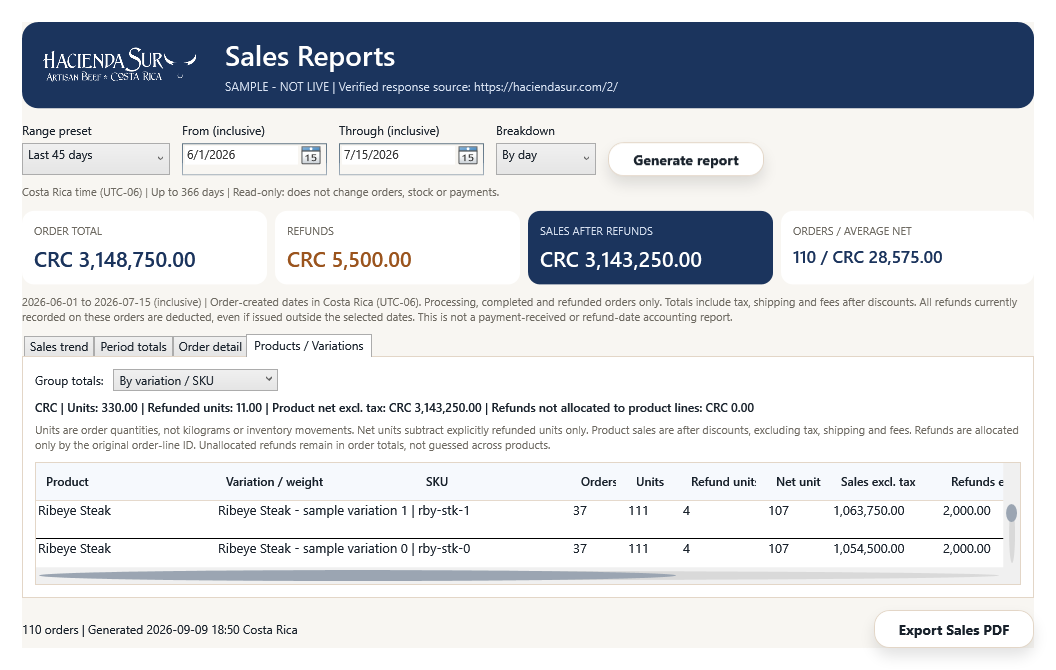
Actual interface with sample data, not client revenue. Date selection, product grouping and PDF export.
Enlarge screenshot ↗Built for Hacienda Sur. Adaptable to your operation.
This approach can fit retailers, food businesses, distributors and other companies managing changing inventory. We review your catalog, payment providers, accounting tools and reporting needs to define a tailored first delivery.